API Catalog
Turn many OpenAPI and AsyncAPI specs into one API catalog.printing press can render one OpenAPI or AsyncAPI document, or it can scan hundreds of them and build an API catalog.
A single spec is nice, but most companies and products have more than one, many more than one. So what do you do when you need to create a catalog of them? We need a nice, clean way to browse every service contract for a product.
The API Catalog feature will do the following:
- Scan a directory recursively for OpenAPI and AsyncAPI contracts.
- Locate multiple versions of the same contract.
- Build a full index of every spec and every version.
- Render out a clean top level portal for all APIs.
- Allow users to navigate between versions of specs.
- Allow users to navigate between the catalog and the docs.
Pass a directory to enter catalog mode:
The output includes a root API Catalog plus full HTML + AI documentation for every discovered spec entry.
Discovery mechanism
Catalog mode scans for all .yaml, .yml, and .json files under the input directory.
A file is treated as a candidate when it contains an openapi, swagger, or asyncapi root marker and parses as a
supported API document.
Catalogs can mix OpenAPI and AsyncAPI 3.x entries. The catalog preserves the contract kind for every entry and routes each one through the correct renderer. AsyncAPI 2.x is not supported; matching 2.x files are retained as visible skipped entries instead of silently disappearing.
Use a configuration file when you need to narrow discovery.
scan:
  root: ./services
  include:
    - "**/*.yaml"
    - "**/*.json"
  ignoreRules:
    - "**/vendor/**"
    - "**/testdata/**"
There are often loads of fixtures, test files, samples, examples and more that we do not want sucked into the engine.
Catalog custom content
API Catalog builds can also render custom content.
Place the same conventional Markdown files at the catalog scan root:
services/
  about.md
  quickstart.md
  docs/
    guide.md
    faq.md
  users/
    openapi.yaml
  billing/
    openapi.yaml
Those pages become catalog-level guidance. They render beside the catalog root, not inside each service.
When visible catalog pages exist, the catalog gets a left navigation with:
- API Catalog
- Guides
- the visible custom pages
printing press also writes:
guides.html
so catalog breadcrumbs have a real Guides target.
API grouping and versioning
Discovered specs are grouped into:
- service
- version
- spec entry
By default, printing press walks backward through the containing path and skips
common noise segments. What printing press ignores can be configured.
The version comes from info.version first. If that is empty, printing press tries version-like filename tokens.
If no version is found, the entry is unversioned.
Train travel catalog example
To make it easy to demonstrate this capability, the printing press repo ships a catalog example at:
examples/train-travel-catalog/
It contains six sample service contracts:
examples/train-travel-catalog/
  printing-press.yaml
  services/
    stations/v1/openapi.yaml
    trips/v1/openapi.yaml
    bookings/v1/openapi.yaml
    bookings/v1/admin.yaml
    bookings/v2/openapi.yaml
    payments/v1/openapi.yaml
Run it from the example directory:
The configuration file supplies
scan.root, so no positional argument is required.
Multiple specs in one version
Catalog mode supports more than one spec in the same service and version.
For example:
services/bookings/v1/openapi.yaml
services/bookings/v1/admin.yaml
Both files are grouped under the bookings service and v1 version. Each gets its own spec entry under:
api-docs/services/bookings/versions/v1/specs/<entry>/
Build modes
Three build modes exist based on your needs: rebuild everything, do an incremental rebuild, or watch for changes live.
fullrebuilds everythingfastrescans and rebuilds only changed specswatchincrementally rebuilds as specs change (not fully implemented yet)
Examples:
In fast mode, printing press maintains a local database of all specs that have been processed and will not
re-render them until they have changed.
In watch mode, you can edit API specs in real time and see them re-rendered automatically (this feature is not fully
operational yet, we’re working on it).
Render pool tuning
Large catalogs render docs in parallel. This could result in hundreds of thousands of files being generated, gigs of data for insanely large surfaces. Thousands of specs create millions of files.
Render pools are a feature of the printing press that spin up workers that break down tasks over multiple available cores.
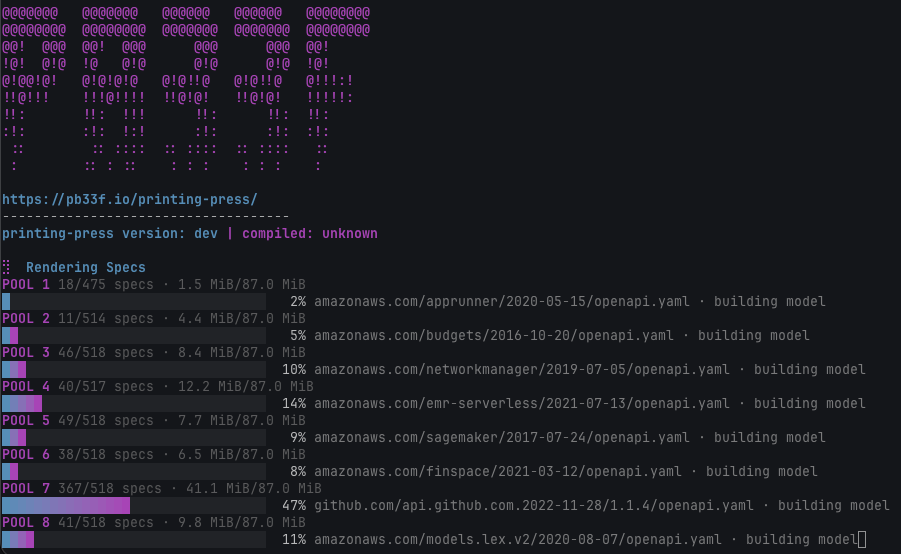
Control the pools config with:
--max-pools--workers-per-pool
Example:
Add --metrics when a large catalog render needs live runtime visibility. It prints elapsed time, heap usage, reserved memory, allocated memory, collection count, and thread count while the render pools are active.
Generated mock limits
Generated schema examples are bounded so large specs cannot spend unbounded work on regex patterns or huge mock payloads. The defaults are intentionally conservative, and most builds should not need to set these flags.
Tune them when a catalog needs different mock-generation ceilings:
--max-pattern-repeat-budget--max-generated-string-bytes--max-generated-mock-bytes
Example:
Use 0 to keep the renderer default.
Skipped rendering warnings
If a discovered spec cannot be rendered, printing press keeps building the rest of the catalog and reports a skipped-render warning.
Hide those skipped-render warnings in the catalog page with:
API Catalog AI / Agent output
The API Catalog builds emit a navigable LLM output tree. An Agent should have no trouble navigating through the content.
- api-docs/
AGENTS.md - api-docs/
llms.txt - api-docs/services/<service>/
llms.txt - api-docs/services/<service>/versions/<version>/
llms.txt - api-docs/services/<service>/versions/<version>/specs/<entry>/
AGENTS.md - api-docs/services/<service>/versions/<version>/specs/<entry>/
llms.txt
Start at the root files when you want an agent to discover the catalog safely.
For very large catalogs, tune aggregate LLM output with:
--llm-aggregate-spec-size-threshold-bytes--llm-max-aggregate-file-bytes--llm-generate-monoliths(auto,always, ornever)
These controls decide when monolithic LLM files are generated and how large aggregate shards should be.
The full AI and agent output model is covered in agentic AI.